
Vico Nature: Smart Nature View
VicoTechTools
4.1201.00 Reviews
- Version
- 1.1.0
- Installs
- 100.00K
- Age Rating
- Everyone
Screenshots
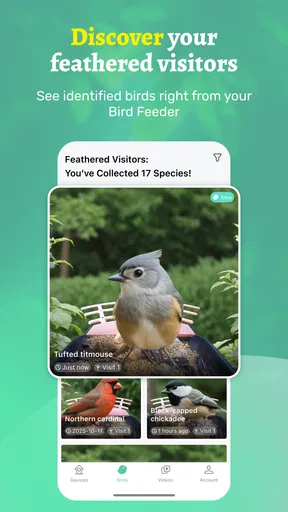
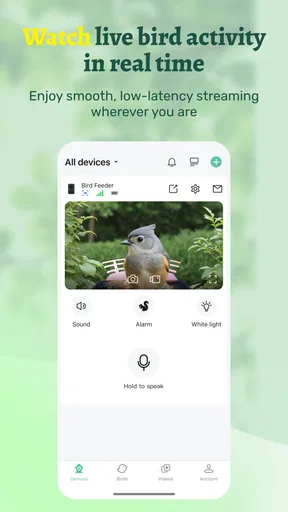
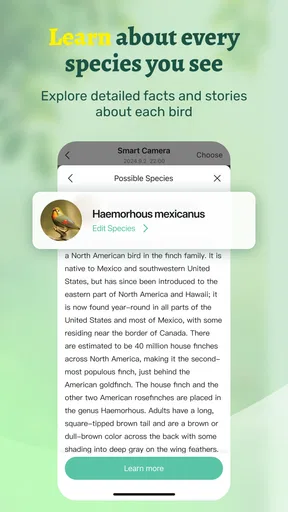
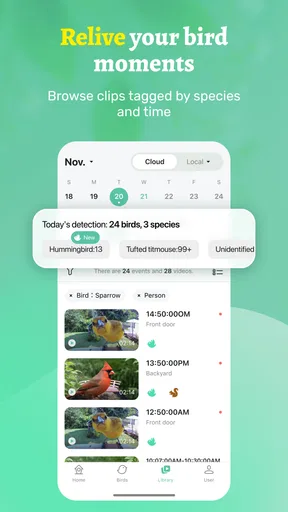
Our Review of Vico Nature: Smart Nature View
 Analysis by Appyee
I spent time with Vico Nature: Smart Nature View as a simple bird-watching companion, and its appeal became clear quickly: it gives a phone a more deliberate role when I am looking out a window, sitting in a garden, or visiting a place where birds are active. It is a free tools app from VicoTech, aimed at people who want to see and record birds at home or away rather than turn birding into a complicated technical project.
That focus matters. I did not approach it as a full wildlife database, a professional field notebook, or a replacement for a dedicated camera. I found it more useful as a lightweight way to pay attention, save observations, and keep a personal record of what I notice. The experience is straightforward enough for casual users, while the recording angle gives it more purpose than simply opening a camera whenever a bird appears.
The app has an average rating of 4.1 from around 500 ratings and more than 200 written reviews, with over 100,000 installs. Those figures suggest that it has found a real audience without making it feel like a mass-market social platform. Its Everyone age rating also fits the gentle, family-friendly nature of the subject.
What using Vico Nature feels like in everyday situations
The best way to understand this app is to imagine a normal morning at home. I might notice movement near a balcony, pause with my phone, and use the app to observe instead of immediately scrolling through unrelated notifications. If the bird stays long enough, I can make a record while the moment is still fresh. That small change in behavior is where the app earns its place: it encourages observation rather than passive consumption.
It also works for a short outing. A walk through a park does not need to become a formal birding trip. I can open the app when something catches my eye, record the sighting, and continue walking. This makes it suitable for families, beginners, and anyone who wants a low-pressure introduction to noticing local wildlife.
I would not describe it as an app that removes all uncertainty from bird watching. A quick sighting can still be difficult to document, especially when the subject moves quickly or stays far away. The practical value is in helping me preserve the event and build a habit. That is more modest than instant expert identification, but it is also a more realistic expectation.
Speed expectations before the first sighting
For this kind of tool, perceived speed is less about dramatic animation and more about whether I can get from opening the app to observing without losing the moment. Vico Nature benefits from a focused purpose. It is not asking me to manage a large entertainment feed or navigate a crowded collection of unrelated tools. That makes the basic experience feel easier to approach when a bird appears unexpectedly.
There is an important distinction between app responsiveness and the speed of nature itself. The app can be ready to use, but a bird may fly away before I frame anything or complete a record. I learned to treat the first few seconds as observation time: look first, then interact carefully. This is a better workflow than immediately tapping through every available control.
When I use it at home, keeping the phone unlocked and nearby makes a noticeable difference to the overall experience. That is not a special feature of the app; it is simply the practical reality of recording brief wildlife moments. If the phone is across the room, any app will feel slow because the opportunity has already passed.
The current release is version 1.1.0, and it supports devices running Android 7.0 or later. That broad operating-system range is helpful for people using older phones, although the actual feel will still depend on the device. A newer phone is more likely to open and respond comfortably, while an older model may make camera-related use feel less immediate.
Where heavier use can expose friction
The app is easiest to judge during repeated short sessions rather than one long, uninterrupted test. Bird watching often means opening the phone, observing, recording, putting it away, and returning later. That pattern suits the concept well, but it also means the app’s value depends on how little effort each return visit requires.
A busier session can happen during a garden visit when several birds appear close together. In that situation, I would avoid trying to document every movement. A better approach is to choose the clearest observation, complete it carefully, and then continue watching. Treating the app as a field notebook instead of a frantic capture tool makes the experience calmer and reduces missed moments.
This is one of the app’s less obvious trade-offs. Recording everything sounds attractive, but wildlife rarely cooperates with a perfect sequence of entries. The more ambitious the record, the more time I spend looking at the screen instead of the surroundings. Vico Nature is most useful when it supports attention, not when it becomes the main activity.
Longer outings also raise ordinary phone concerns. Camera use and repeated screen activity can demand more from a device than a quick text-based note. I would start a walk with enough battery and avoid assuming that any phone will handle a full day of intensive observation without preparation. The app itself is not a substitute for sensible field habits.
Reliability is about recovering the moment
For a bird-recording app, reliability is not only about whether it opens. It is also about whether I can recover from an imperfect observation. A bird may disappear, the image may be unclear, or I may realize that I was too focused on tapping the screen. The most dependable workflow is to record what I genuinely observed rather than trying to create a polished entry from memory later.
I found that restraint improves the quality of the record. If I am unsure what I saw, I would rather keep the note tied to the actual sighting than make a confident claim that the moment did not support. This is especially important for beginners, who can easily mistake a distant shape or brief flight pattern for a definite identification.
Another useful habit is to pause after each recording and check that the result represents the moment I intended to save. That extra second can prevent a vague memory from replacing a real observation. It also makes the app more valuable over time because a personal log is only as useful as the care put into its entries.
My main reliability expectation would therefore be modest and practical: use it as a companion, not as the sole archive of irreplaceable wildlife footage. If a sighting is genuinely important, I would keep an additional record in a way that suits my own routine. The app can support the process, but no phone-based tool can guarantee a perfect capture when the subject is unpredictable.
Device limits that affect the experience
The minimum Android requirement of 7.0 makes Vico Nature accessible to a wide range of phones, but operating-system compatibility should not be confused with identical performance. Older hardware may have less comfortable camera handling, slower transitions, or less room for multitasking. Anyone using an aging device should test the app at home before relying on it during a planned outing.
Screen size also matters more than I first expected. A compact phone is convenient to carry, but it can make careful viewing and recording less comfortable. A larger display may be easier for reviewing what I saw, although it is less discreet when I am trying to observe birds without drawing attention to myself.
Storage is another practical consideration whenever an app is used for repeated recordings. I would periodically review saved material and remove mistakes or duplicate attempts. This is not just housekeeping: a smaller, cleaner personal record is easier to revisit, especially after several walks or weeks of watching birds from home.
Battery planning is equally important. A short observation near a window is unlikely to create a problem, but repeated camera use, bright screens, and frequent opening and closing can add up during a day outside. Carrying a charger or power bank makes sense for serious outings, regardless of whether the phone is new or old.
How it compares with ordinary alternatives
The simplest alternative is the phone’s standard camera app. That option is better when my only goal is to capture a photo or video as quickly as possible. It usually has fewer distractions between me and the subject, and I already know how to use it. If I do not care about keeping a structured nature record, the regular camera may be the more efficient choice.
A notes app is another competitor. It can be faster for typing a time, place, and short description, and it gives me complete control over the format. For someone who prefers detailed written observations or already maintains a nature journal, a notes app may remain more flexible than Vico Nature.
Dedicated birding services can be a better fit for users who want extensive reference material, advanced identification help, or a larger community around their observations. I would choose one of those when expert-level research is the main goal. Vico Nature makes more sense when I want a focused, approachable way to see and record birds without turning every outing into a research session.
The trade-off is clear: the more specialized the alternative, the more it may offer for serious identification and organization, but the more time it may demand. Vico Nature’s strength is its narrower purpose. It sits between a generic camera and a demanding specialist platform, which is exactly why it can feel comfortable for beginners.
Three workflows that make the app more useful
My first recommendation is to use a “look, then record” routine. Spend a moment watching the bird’s movement and surroundings before touching the phone. This improves the chance that the saved observation reflects what actually happened and prevents the screen from taking over the experience.
Second, use short observation sessions rather than leaving the app active without a reason. A few intentional checks from a window or garden are easier on attention, battery, and storage than trying to document every passing bird. This approach also makes the record more meaningful because each entry represents a moment I consciously chose to keep.
Third, review the record after an outing while the details are still fresh. I can separate clear observations from uncertain ones, remove accidental attempts, and notice patterns in where I tend to see birds. That review step turns isolated captures into a personal learning routine, even without treating the app as a formal scientific database.
These workflows reveal a strength that is easy to miss from a short store description: the app works best when it changes how I observe. It is not merely a button for collecting media. Its real usefulness comes from giving a casual sighting enough structure to become something I can remember and revisit.
Who should use it, and who should skip it
I would recommend Vico Nature to a beginner who wants a friendly starting point, a parent looking for a quiet outdoor activity, or anyone who regularly sees birds from a balcony, yard, or nearby park. It is also a reasonable choice for people who want to build a simple observation habit without buying specialist equipment.
It may suit travelers as well, especially when the aim is to record small discoveries during a trip rather than produce professional wildlife photography. The free entry point makes it easy to try, although in-app purchases range from $0.99 to $99.99 per item, so I would pay attention to any purchase screen and decide in advance what level of use is worthwhile for me.
I would skip it if I mainly need a fast camera, a deep identification encyclopedia, or a highly detailed research log. I would also hesitate if my phone is very old, has little free storage, or struggles with camera-heavy tasks. In those cases, a simpler notes workflow or the built-in camera may be less frustrating.
The app is free to install, but “free” does not automatically mean that every possible use will feel equally complete. I would begin with the basic experience, see whether recording birds becomes part of my routine, and only then consider optional spending. That keeps the decision grounded in actual use rather than curiosity at the moment of installation.
My performance verdict after regular use
Vico Nature: Smart Nature View succeeds because it keeps its purpose understandable. I can open it at home, take it on a walk, and use it as a bridge between noticing a bird and keeping a record of the encounter. Its perceived speed is strongest when I prepare the phone beforehand and keep my actions simple. Its resource demands are more likely to come from repeated screen and camera use than from the basic idea of recording itself.
Its limitations are just as important. It cannot make unpredictable wildlife behave, and it should not replace careful observation or a specialist tool when accuracy and depth matter most. Older devices may feel less comfortable even though Android compatibility reaches back to version 7.0. The optional purchase range also means I would approach the app with a clear spending boundary.
Overall, I see it as a practical tool for casual and developing bird watchers rather than an all-in-one professional solution. The developer, VicoTech, has positioned it in a useful middle ground: more purposeful than a standard camera, but less demanding than a specialist birding platform. If you want a gentle way to notice birds at home or away and keep those moments from disappearing, I think it is worth trying.
My final advice is to judge it by the habit it creates, not by how many sightings you can collect. Used patiently, it can make an ordinary window view or short walk feel more engaging. Used under pressure to capture everything perfectly, it will feel less satisfying. For the right user, that balance is the app’s strongest feature.
Verdict
Strengths of Vico Nature: Smart Nature View
- Turns your phone into a calming digital window to nature.
- Useful for relaxation, meditation, study, or background ambience.
- Nature visuals can make idle screen time feel more pleasant.
- Simple concept that is easy to understand and use.
- Suitable for users seeking a peaceful alternative to busy wallpapers.
Limitations of Vico Nature: Smart Nature View
- May feel repetitive if you expect interactive nature content.
- Nature scenes can consume extra battery during extended viewing.
- The experience depends heavily on your display quality and brightness.
- Limited appeal for users who prefer games or highly interactive apps.
- Some features or visual options may require in-app purchases.
Other Releases by VicoTech
View All
VicoHome: Smart Home Camera
Video Players & Editors4.4
Similar Picks in This Category
View All
Google LLC4.0

Gboard - the Google Keyboard
Google LLC4.5

Google Play services
Google LLC4.3

Google Play Store
Google LLC4.9

Files by Google
Google LLC4.5

SHAREit: Transfer, Share Files
Smart Media4U Technology Pte.Ltd.4.3
Frequently Asked Questions
What is Vico Nature: Smart Nature View?
Vico Nature: Smart Nature View is an app designed to help users explore and observe the natural world through a mobile device. It presents nature-related information and visual content in an accessible format, making it useful for people who enjoy plants, landscapes, wildlife, or outdoor learning. Its overall appeal depends on how much you value convenient nature reference material in one place.
Is Vico Nature: Smart Nature View free to download and use?
The app may be available to download at no initial cost, but users should check the current Google Play Store or Apple App Store listing for the exact pricing model. Some features may require in-app purchases, a subscription, or may be limited in the free version. Before installing, review the store description, payment details, and cancellation terms to avoid unexpected charges.
Does Vico Nature: Smart Nature View require an internet connection?
An internet connection may be needed for downloading nature content, updating information, loading images, or accessing online features. Basic sections could remain available offline after they have been opened, but this should not be assumed for every function. If you plan to use the app during hikes or in areas with weak coverage, test its offline behavior before relying on it.
Is Vico Nature: Smart Nature View suitable for children and beginners?
The app can be appealing to beginners, families, and anyone starting to learn more about nature because mobile presentation is generally easier to approach than a specialist guide. However, parents should review the app’s content, advertising, permissions, and privacy policy before allowing children to use it. It should support learning, not replace supervision or expert advice about potentially dangerous plants or animals.
What permissions and privacy considerations should users check?
Before downloading Vico Nature: Smart Nature View, examine the permissions requested by the app and compare them with its stated purpose. Access to photos, location, notifications, or network data may be useful for certain features, but unnecessary permissions deserve caution. Also read the developer’s privacy policy to understand what information may be collected, how it is used, and whether data is shared with third parties.
